Diagrams — rhetorical primitives, not SmartArt
A small library of named diagram structures, each one carrying a specific argument shape. Reach for these when prose can't hold the structure of the claim — when the data is shaped like a 2×2, a cycle, a comparison pair, a phase decomposition, a hierarchy. Don't reach for them when the data is shaped like a list.
Part of the muriel skill — see the top-level index for mission and universal rules. Sister channel: infographics.md for K-Dense-style multi-element compositions; this channel is the primitive layer underneath.
Why this channel exists
Office SmartArt ships ~200 "diagrams." Most of them are decorated lists — cells with chevrons, gears, and concentric rings that don't encode anything beyond visual interest. They are how presentations confuse the eye into thinking the speaker has structured a thought.
This channel ships a curated set of diagrams that earn their geometry. Each one has:
- An epistemic precondition — the shape of data or claim it can honestly carry. If your content doesn't match, don't use it.
- An anti-prescription — when reaching for that structure misleads. Documented in the function's docstring.
- A deterministic SVG generator — brand-aware, contrast-audited, hand-written SVG (no external rasterizer dependency on the core path).
- A JSON-driven CLI so an agent can render one without writing Python.
Pre-flight question for every diagram: if I removed the geometry, would the reader lose information? If no, ship the list.
Prioritized catalog
Ordered by how often each structure carries a real argument in research, product, and editorial work. Bold is shipped today; the rest are queued in TODO.md.
| # | Structure | What it argues | Status |
|---|---|---|---|
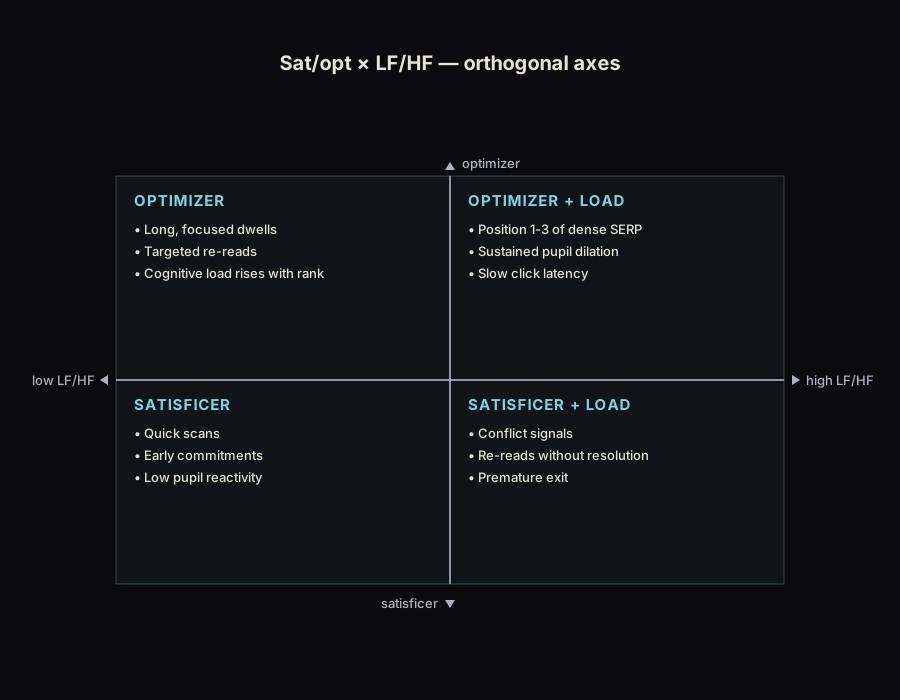
| 1 | 2×2 matrix | Two independent binary axes divide a population into four meaningful classes. | Shipped — muriel.tools.diagrams.matrix |
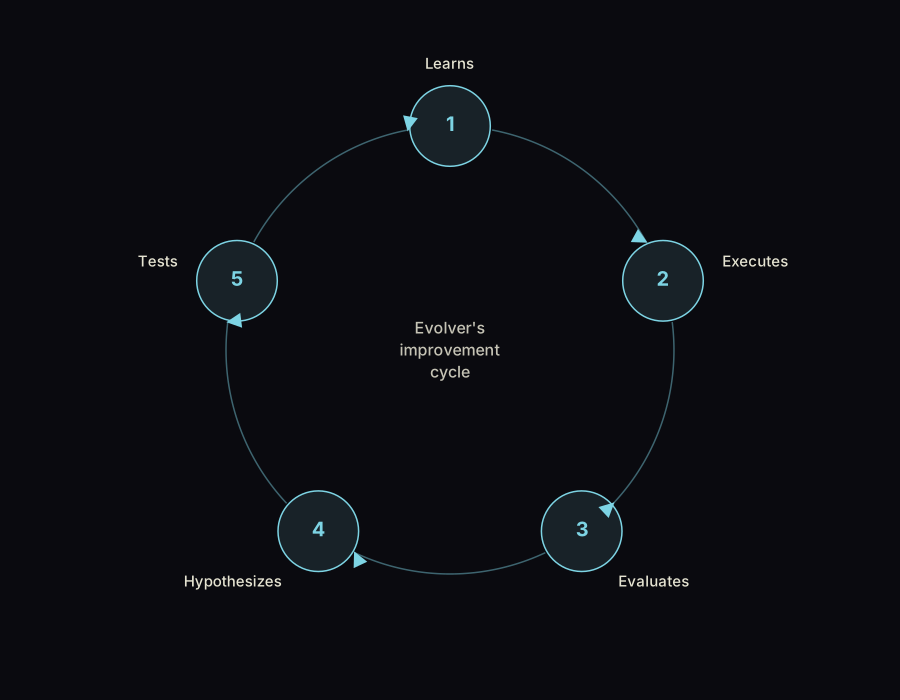
| 2 | Cycle (3–8 step) | Iterative process with no exit; each step feeds the next. | Shipped — muriel.tools.diagrams.cycle |
| 3 | Comparison pair | Same axes, one variable changed — the smallest Tufte small-multiple. | Queued |
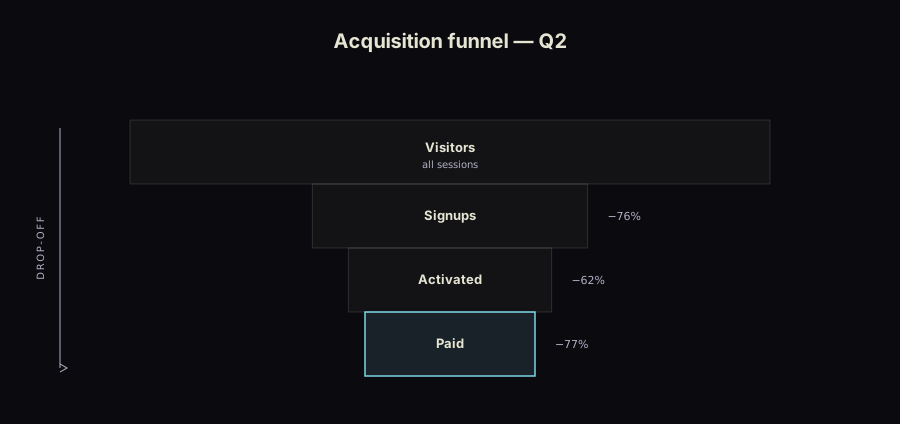
| 4 | Phase / funnel | Sequential narrowing; later phases are subsets of earlier. | Shipped — muriel.tools.diagrams.pyramid (orientation="down") |
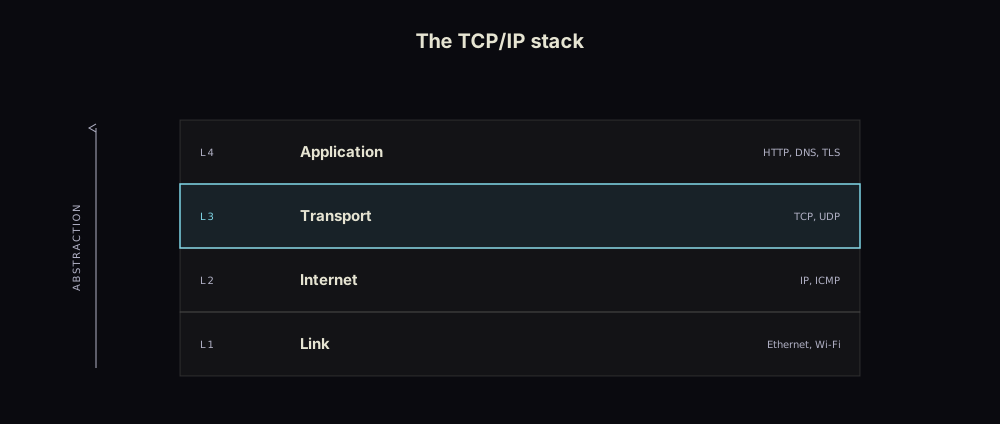
| 5 | Layered stack | Higher layers depend on / abstract over lower; reading direction encodes hierarchy. | Shipped — muriel.tools.diagrams.layer_stack |
| 6 | Causal DAG | What causes what; arrow direction is load-bearing. | Queued |
| 7 | Venn / Euler | Categorical intersection; area-proportional. | Shipped — muriel.tools.venn |
| 8 | Spectrum | Position between two poles is the encoding. | Queued |
| 9 | Pyramid | Each level depends on the one below; apex is rare or important. | Shipped — muriel.tools.diagrams.pyramid (orientation="up") |
| 10 | Comparison heat-grid | Dense n × m comparison; small multiples for categorical evals. |
Queued |
| 11 | Swimlane | Cross-functional process; the handoffs between actors are the point. | Shipped — muriel.tools.diagrams.swimlane |
Explicitly excluded. Process arrows, list-with-chevrons, interconnected blocks, radial gear cosmetics, target-with-concentric-rings as decoration. If a SmartArt category exists only to ornament a list, this channel will never ship it.
This channel is not the only path
Several diagram forms have an existing home elsewhere in muriel. The native generators here are the static, brand-locked, print-ready option — the right pick for a paper figure or editorial SVG that must clear the 8:1 floor with no JS runtime. They are deliberately not the exclusive provider. Before reaching for one, check whether an existing substrate already serves the form better:
| Form | Native generator | Existing alternative — and when to prefer it |
|---|---|---|
| 2×2, cycle, layer-stack, pyramid/funnel, swimlane, Venn | this channel | — (no cleaner substrate; these are the primitives) |
| Sequence / interaction | — | Mermaid sequenceDiagram via mmdc (svg.md). Prefer Mermaid; only port to native SVG if a paper figure forbids the Mermaid aesthetic. |
| State machine | — | Mermaid stateDiagram-v2. Same call. |
| ER / data model | — | Mermaid erDiagram. Same call. |
| Flowchart / generic DAG | — | Mermaid flowchart today; native causal DAG is queued (catalog #6) for when arrow-direction is the load-bearing claim. |
| Timeline | — | ECharts time-axis + band overlays (echarts.md), the svg.md OSEC phase diagram, or the infographics Timeline template (infographics.md). All predate this channel. |
| Single-actor process flow | swimlane (degenerate) | infographics Process template — lighter when there are no lanes. Use swimlane only when ownership/handoffs are the argument. |
| Tree / org-chart | — | ECharts tree series (interactive) or the infographics Hierarchical template. |
| Nested hierarchy (proportional) | — | Queued hierarchy family — sunburst / treemap / dendrogram (see TODO.md #45), ECharts-backed. |
| Magnitude flow | — | Queued Sankey primitive (TODO.md #44). |
Rule of thumb: Mermaid for node-link relational diagrams (sequence, state, ER, flowchart), ECharts when the diagram is data-driven or interactive (timeline, tree, treemap, sunburst), and this channel when the output is a static editorial SVG whose geometry encodes a specific rhetorical claim.
When the Mermaid diagram is rendered into an HTML page (not exported to a flat SVG) and it's large enough to render unreadable, wrap it in the zoom/pan/expand shell below — a complex flowchart squeezed into a fixed column is illegible without it.
API conventions
Every generator follows the same signature shape, same as muriel.tools.venn:
Returns the path written. brand is an optional StyleGuide loaded from a brand.toml; without it, generators fall back to the OLED palette.
Each module also exposes a _main CLI:
python -m muriel.tools.diagrams.matrix spec.json out.svg
python -m muriel.tools.diagrams.cycle  spec.json out.svg
The JSON spec mirrors the Python kwargs. See each module's docstring for the schema.
Labels are measured; containers grow
The geometry numbers in each generator — a 144px step box, a 168px lane gutter, a 160px pyramid apex — are floors, not limits. Every label is measured before it is drawn (muriel/tools/diagrams/_labels.py, built on muriel.layout.text_bbox), and when it doesn't fit, the container grows:
| Situation | What happens |
|---|---|
| Multi-word label wider than its box | Wraps on measured width, breaking only between words |
| Wrapping needs more rows than the box has | Box gets taller — uniformly, so the grid stays regular |
| A single word wider than the box | Box gets wider; words are never split or hyphenated |
| A label that would land off-canvas | Canvas grows around the figure, which keeps its size |
| A pyramid label wider than its tier | min_w and max_w scale together, so the taper is preserved exactly — the taper is the argument, and flattening it to fit a word would change the claim |
What never happens: text shrinking to fit, text clipping at a boundary, or a white-stroke halo painted behind a label that crosses something. That is muriel.layout's rule — the data is the artifact, the label finds space around it — applied to a fixed grid.
Growth is strictly conditional: a diagram whose labels already fit renders byte-for-byte as it did before this existed, which is what tests/test_diagram_labels.py asserts against every committed example. The same test reads rendered SVG back and fails on three defects the generators used to ship silently — labels overlapping each other, labels off the canvas, and labels spilling out of their own box.
2×2 matrix
from muriel.tools.diagrams import matrix

matrix(
    quadrants=[
        {"label": "OPTIMIZER", "items": ["Long, focused dwells",
                                         "Targeted re-reads"]},
        {"label": "OPTIMIZER + LOAD", "items": ["Position 1-3 of dense SERP",
                                                "Sustained pupil dilation"]},
        {"label": "SATISFICER", "items": ["Quick scans",
                                          "Early commitments"]},
        {"label": "SATISFICER + LOAD", "items": ["Conflict signals",
                                                 "Re-reads without resolution"]},
    ],
    axes=[("low LF/HF", "high LF/HF"), ("satisficer", "optimizer")],
    title="Sat/opt × LF/HF — orthogonal axes",
    out_path="examples/diagrams/matrix-sat-opt.svg",
)
Quadrants can be a 4-list in TL → TR → BL → BR order, or a dict keyed by top_left / top_right / bottom_left / bottom_right. Each cell is a string (just a label) or a dict {"label": str, "items": [str, ...]} (label plus up to 6 bullets).
Axes are ((x_low, x_high), (y_low, y_high)). The four endpoint labels sit at the cardinal positions of the cross with SVG-path arrows so they render correctly even without system fonts (cairosvg-safe).
Anti-prescriptions (also in the docstring):
- Don't use a 2×2 if your axes are correlated. Half the cells will be empty; you've drawn a line, not a matrix. Plot the scatter instead.
- Don't use a 2×2 to disguise a list. Four bullet points pretending to occupy quadrants is worse than four bullet points.
- Don't label cells with marketing words ("Stars / Cash Cows / Dogs / Question Marks") if your audience won't recognize them. Use the actual short claim each cell carries.
N-step cycle
from muriel.tools.diagrams import cycle

cycle(
    steps=["Learns", "Executes", "Evaluates", "Hypothesizes", "Tests"],
    center="Evolver's\nimprovement\ncycle",
    direction="clockwise",
    out_path="examples/diagrams/cycle-evolver.svg",
)
Steps is a list of 3–8 entries. Each entry is a string or a dict {"label": str, "icon": <svg-inner-markup or None>}. The icon slot is a hook for an icon library — pass raw SVG path/group markup to render at the node. Icons are optional; the MVP renders cleanly with text labels alone.
Direction is "clockwise" (default) or "counterclockwise". The first step always sits at the top.
Anti-prescriptions:
- Don't use a cycle if there's a real exit condition. A funnel, sequence, or flowchart is the honest shape — cycles claim the iteration is real.
- Don't cycle a list of unrelated steps. If step N+1 doesn't depend on step N's output, you've drawn a clock face, not a process.
- Don't exceed 8 steps. Past 8, no reader can hold the loop in working memory; decompose into nested cycles or sequential phases.
Layered stack
from muriel.tools.diagrams import layer_stack

layer_stack(
    layers=[
        {"tag": "L4", "label": "Application", "note": "HTTP, DNS, TLS"},
        {"tag": "L3", "label": "Transport",   "note": "TCP, UDP", "focal": True},
        {"tag": "L2", "label": "Internet",    "note": "IP, ICMP"},
        {"tag": "L1", "label": "Link",        "note": "Ethernet, Wi-Fi"},
    ],
    title="The TCP/IP stack",
    axis_label="abstraction",   # left-margin axis word; arrow points per axis_dir
    axis_dir="up",              # "up" = upper layers abstract over lower
    out_path="examples/diagrams/layers-tcpip.svg",
)
Layers is 4–6 entries in reading order, top to bottom (index 0 is the top band). Each is a string or a dict {"label", "tag", "note", "focal"} — tag is the far-left index eyebrow ("L3", "07", "APPLICATION"), note is the muted far-right annotation, focal flags the one band to highlight. The focal= kwarg overrides per-layer flags; highlight at most one (the bottleneck or the layer under discussion).
Anti-prescriptions (also in the docstring):
- Don't stack non-hierarchical peers — if the bands don't rest on each other, you want a swimlane or architecture diagram, not a stack. A stack claims load-bearing order.
- Don't skip indices (
L1, L2, L4) — it sends the reader hunting for the missing layer. - Don't exceed 6 layers, and don't paint every band a different hue — polychrome reads as unrelated categories, the opposite of "one ladder."
Pyramid / funnel
from muriel.tools.diagrams import pyramid

# Funnel — honest widths from real counts
pyramid(
    tiers=[
        {"label": "Visitors",  "value": 100000, "sublabel": "all sessions"},
        {"label": "Signups",   "value": 24000,  "annotation": "−76%"},
        {"label": "Activated", "value": 9000,   "annotation": "−62%"},
        {"label": "Paid",      "value": 2100,   "annotation": "−77%"},
    ],
    orientation="down",     # "down" = funnel (apex at bottom = conversion)
    proportional=True,      # widths ∝ value; the taper is a measurement, not a vibe
    title="Acquisition funnel — Q2",
    axis_label="drop-off",
    out_path="examples/diagrams/funnel-q2.svg",
)
Tiers is 4–6 entries in reading order, top to bottom, each a string or a dict {"label", "sublabel", "annotation", "value", "focal"}. orientation="up" draws a pyramid (apex on top, narrow = rare/valuable); "down" draws a funnel (apex at bottom, narrow = converted). With proportional=True and a value on every tier, each tier becomes a centred bar whose width is proportional to its value — an honest funnel; otherwise tiers taper linearly, which says "narrowing" without faking a measurement. focal defaults to the apex (top tier for a pyramid, conversion tier for a funnel); pass focal=-1 to highlight nothing.
Anti-prescriptions:
- Don't use a pyramid for non-hierarchical data — if tiers don't rest on each other, width encodes nothing and you've drawn a decorative triangle. Use a bar chart.
- Don't fake funnel widths. If they aren't proportional to the counts, the reader sees a drop-off that isn't there — pass real
values or say in the caption that the taper is ordinal. - Don't highlight the base. Coral on the broad base dilutes the "apex = rare" signal.
Swimlane
from muriel.tools.diagrams import swimlane

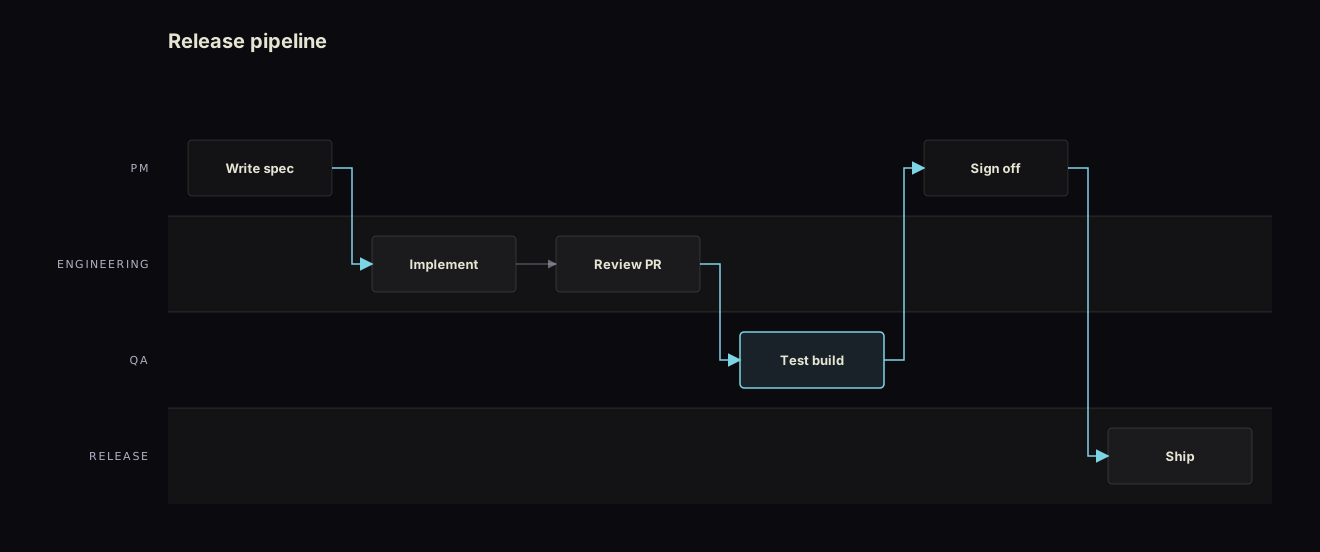
swimlane(
    lanes=["PM", "Engineering", "QA", "Release"],
    steps=[
        {"label": "Write spec", "lane": "PM"},
        {"label": "Implement",  "lane": "Engineering"},
        {"label": "Review PR",  "lane": "Engineering"},
        {"label": "Test build", "lane": "QA", "focal": True},
        {"label": "Sign off",   "lane": "PM"},
        {"label": "Ship",       "lane": "Release"},
    ],
    title="Release pipeline",
    out_path="examples/diagrams/swimlane-release.svg",
)
Lanes is 2–6 actor/team labels, top to bottom. Steps are listed in flow order; each names its owning lane (label or row index) and gets the next column automatically (pass an explicit col to place two steps in the same column for a parallel fork). Consecutive steps are joined by a flow arrow; a step that changes lane draws an emphasised handoff arrow in the accent colour — the handoffs are visually the loudest thing, because they're the point.
Reach for this only when ownership is the argument — see the provider table: a single-actor flow is lighter as an infographics Process template, and an interactive/runtime flow is faster in Mermaid.
Anti-prescriptions (also in the docstring):
- Don't draw lanes you can't label — an unlabeled lane is a row with no actor; collapse it.
- Don't let a step span two lanes — every step has one owner. Shared ownership is a process smell, not a diagram feature.
- Don't snake the flow — if arrows backtrack to read in order, re-sequence the steps so progression runs forward.
Design discipline
The generators bake in the editorial-diagram discipline that keeps SVG from reading as AI-generated SmartArt:
- 4px-increment alignment. All band heights, margins, and offsets land on a 4px grid (
band_h = 64,tier_h = 64, paddings of 48). Off-grid drift is the tell. - 1px hairline dividers, no fills competing with content. Non-focal bands use a near-invisible
paperwash (rgba(ink, 0.04)); structure is carried by hairline strokes, not boxes. - No shadows, no gradients, no glow. Nothing in
<defs>but the arrow marker. Depth is implied by order, not by drop-shadows. - One accent, one focal element. A single layer/tier gets the accent stroke + tint. Two highlights is no highlight.
This is a philosophy import, not a brand import: the tokens stay muriel's own (OLED palette, StyleGuide fonts) and text clears the 8:1 contrast rule — stricter than the source's WCAG AA. We did not adopt the source's typefaces or colour system.
Attribution. The layout proportions for
layer_stack,pyramid, andswimlane(band/tier/lane heights, taper rules, lane dividers + handoff emphasis, label placement, the focal-accent convention) are adapted from the MIT-licenseddiagram-designskill, © 2025 Cathryn Lavery. muriel's contribution is the deterministic Python generators, the epistemic-precondition / anti-prescription gate on each, the 8:1 contrast floor, and brand-token integration. SeeTHIRD_PARTY_NOTICES.mdfor the full license.
Worked examples
Both examples below render to examples/diagrams/:
cycle-evolver.svg— a 5-step iteration loop with a centre label; honest re-rendering of the AI-generated reference image whose text was visibly mangled.matrix-sat-opt.svg— sat/opt × LF/HF, the orthogonality finding from ETTAC 2026. The matrix-shape claim is testable: if the axes were correlated, the diagonal cells would dominate; here the off-diagonal cells (OPTIMIZER + LOAD,SATISFICER + LOAD) carry distinct content, which is the data justification for a 2×2 over a 1D scatter.layers-tcpip.svg— a 4-layer dependency stack with the Transport layer as the focal band and an "abstraction ↑" axis; the stack shape is honest because each layer genuinely depends on the one below.funnel-q2.svg— a proportional acquisition funnel; tier widths are driven by real counts (proportional=True), so the visual drop-off matches the−%annotations rather than faking a taper.swimlane-release.svg— a 4-lane release pipeline; same-lane steps connect with a muted arrow, cross-lane handoffs are drawn in the accent because the handoffs are the claim.
Mermaid in HTML — the zoom/pan/expand shell
The native generators above emit flat SVG; Mermaid (routed to from the provider table) renders inside the page at runtime. A flowchart with 10+ nodes, a deep sequence diagram, or any graph wider than its column collapses into an unreadable thumbnail — Mermaid auto-fits the SVG to the container and the labels shrink past the legibility floor. The fix is a viewport shell that lets the reader zoom, pan, and pop the diagram out full-size, instead of squinting at a 9px label.
This is a runtime web affordance, not a static-SVG generator: it belongs in any HTML page that renders Mermaid client-side (an editorial post, a review doc, a web.md artifact). It is theme-driven by muriel's --mg-* brand tokens, clears the 8:1 floor on every control, and respects prefers-reduced-motion.
Wrapper structure
One .diagram-shell per diagram. The Mermaid source lives in a <script type="text/plain" class="diagram-source"> block, so multiple diagrams coexist on a page with no ID collisions.
.diagram-shell                  ← one per diagram; positioning context
├─ .diagram-shell__hint         ← one-line "how to interact" caption
├─ .mermaid-wrap                ← bordered card; sets cursor + adaptive height
│  ├─ .zoom-controls            ← +  −  ⟲(fit)  1:1  ⛶(expand)  + live % label
│  └─ .mermaid-viewport         ← overflow:hidden clip region
│     └─ .mermaid-canvas        ← absolutely positioned; transform = pan, SVG size = zoom
└─ <script class="diagram-source">  ← raw Mermaid text, never rendered as text
The SVG is rendered into .mermaid-canvas. Zoom sets the SVG's pixel width/height directly (not CSS zoom, which has cross-browser quirks); pan applies transform: translate() to the canvas; the viewport's overflow: hidden clips the panned content. Expand clones the SVG into a new full-window tab.
CSS — muriel tokens, 8:1 controls, reduced-motion safe
Every color resolves through a --mg-* token (see style-guides.md / marginalia), so a single theme switch repaints the shell with the page. Control glyphs and the live zoom label use --mg-text (full contrast, ≥8:1) — not the muted token — because they are informational text, not decoration. muriel.contrast cannot see these states (the SVG and labels are JS-injected), so verify the control contrast by hand against your brand --mg-bg2.
.diagram-shell { position: relative; }

.diagram-shell__hint {
  font-family: var(--mg-font-mono, ui-monospace, monospace);
  font-size: 12px;
  color: var(--mg-text);          /* instructional text → full 8:1, not muted */
  margin-bottom: 8px;
}

.mermaid-wrap {
  position: relative;
  background: var(--mg-bg2);
  border: 1px solid var(--mg-border);
  border-radius: var(--mg-radius, 12px);
  padding: 32px 24px;
  overflow: hidden;
  min-height: 360px;               /* stops vertical flowcharts compressing to thumbnails */
  cursor: grab;
}
.mermaid-wrap.is-panning { cursor: grabbing; user-select: none; }

.zoom-controls {
  position: absolute;
  top: 8px; right: 8px;
  z-index: 10;
  display: flex;
  gap: 2px;
  padding: 2px;
  background: var(--mg-bg2);
  border: 1px solid var(--mg-border);
  border-radius: 6px;
}
.zoom-controls button {
  width: 28px; height: 28px;
  border: none;
  border-radius: 4px;
  background: transparent;
  color: var(--mg-text);           /* glyphs are text → 8:1, never the muted token */
  font-family: var(--mg-font-mono, ui-monospace, monospace);
  font-size: 14px;
  cursor: pointer;
  display: flex; align-items: center; justify-content: center;
  transition: background 0.15s ease;
}
.zoom-controls button:hover { background: var(--mg-border); }
.zoom-controls button:focus-visible {
  outline: 2px solid var(--mg-accent);
  outline-offset: 1px;
}

.zoom-label {
  align-self: center;
  padding: 0 6px;
  font-family: var(--mg-font-mono, ui-monospace, monospace);
  font-size: 11px;
  color: var(--mg-text);           /* live "120% — contain" readout is text → 8:1 */
  white-space: nowrap;
}

.mermaid-viewport {
  position: relative;
  overflow: hidden;
  width: 100%; height: 100%;
  min-height: 300px;
}
.mermaid-canvas { position: absolute; top: 0; left: 0; }

@media (prefers-reduced-motion: reduce) {
  .zoom-controls button { transition: none; }
}
HTML
<section class="diagram-shell">
<p class="diagram-shell__hint">
Ctrl/Cmd + wheel to zoom · scroll or drag to pan · double-click to fit · ⛶ to open full size
</p>
<div class="mermaid-wrap">
<div class="zoom-controls">
<button type="button" data-action="zoom-in" title="Zoom in" aria-label="Zoom in">+</button>
<button type="button" data-action="zoom-out" title="Zoom out" aria-label="Zoom out">−</button>
<button type="button" data-action="zoom-fit" title="Smart fit" aria-label="Fit to view">↺</button>
<button type="button" data-action="zoom-one" title="1:1 zoom" aria-label="Actual size">1:1</button>
<button type="button" data-action="zoom-expand" title="Open full size" aria-label="Open full size">⛶</button>
<span class="zoom-label" role="status">Loading…</span>
</div>
<div class="mermaid-viewport">
<div class="mermaid mermaid-canvas"></div>
</div>
</div>
<script type="text/plain" class="diagram-source">
flowchart TD
Q[Query] --> R{Result type?}
R -->|organic| O[Read snippet]
R -->|ad| A[Evaluate ad]
O --> C[Click or skip]
A --> C
</script>
</section>
JavaScript
Closure-based: per-diagram state lives inside initDiagram(shell); shared drag listeners stay at module scope so two diagrams never fight over the mouse. Mermaid theme variables are pulled from the page's computed --mg-* tokens, so the diagram inherits the brand instead of hardcoding hexes.
<script type="module">
  import mermaid from 'https://cdn.jsdelivr.net/npm/mermaid@11/dist/mermaid.esm.min.mjs';

  const config = {
    fitPadding: 28, minHeight: 360, maxHeightPx: 960, maxHeightVh: 0.84,
    maxInitialZoom: 1.8, minZoom: 0.08, maxZoom: 6.5, zoomStep: 0.14,
    readabilityFloor: 0.58,
  };
  const clamp = (n, lo, hi) => Math.max(lo, Math.min(hi, n));

  // Feed Mermaid from the page's brand tokens so the diagram matches the shell.
  // NOTE: node fill (primaryColor) vs label (primaryTextColor) must clear 8:1 —
  // that contract lives in your brand tokens; verify it on an exported render.
  const root = getComputedStyle(document.documentElement);
  const tok = (name, fallback) => (root.getPropertyValue(name).trim() || fallback);
  mermaid.initialize({
    startOnLoad: false,
    theme: 'base',
    themeVariables: {
      fontFamily: tok('--mg-font-body', 'system-ui, sans-serif'),
      fontSize: '16px',
      primaryColor:       tok('--mg-bg2',  '#15151b'),
      primaryBorderColor: tok('--mg-accent', '#7cc4ff'),
      primaryTextColor:   tok('--mg-text', '#f2f2f6'),
      secondaryColor:     tok('--mg-bg',   '#0b0b0f'),
      tertiaryColor:      tok('--mg-bg2',  '#15151b'),
      lineColor:          tok('--mg-text', '#f2f2f6'),
    },
  });

  // Shared drag state — one mousemove/mouseup pair for the whole page.
  let activeDrag = null;
  addEventListener('mousemove', (e) => activeDrag?.onMove(e));
  addEventListener('mouseup',   ()  => { activeDrag?.onEnd(); activeDrag = null; });

  function initDiagram(shell) {
    const wrap     = shell.querySelector('.mermaid-wrap');
    const viewport = shell.querySelector('.mermaid-viewport');
    const canvas   = shell.querySelector('.mermaid-canvas');
    const source   = shell.querySelector('.diagram-source');
    const label    = shell.querySelector('.zoom-label');
    if (!wrap || !viewport || !canvas || !source || !label) {
      console.error('initDiagram: missing elements in', shell);
      return;
    }

    let zoom = 1, fitMode = 'contain', panX = 0, panY = 0, svgW = 0, svgH = 0;
    let sx = 0, sy = 0, spx = 0, spy = 0;            // mouse-drag anchors
    let touchDist = 0, touchCx = 0, touchCy = 0;     // pinch anchors

    const canPan = () =>
         svgW * zoom + config.fitPadding * 2 > viewport.clientWidth
      || svgH * zoom + config.fitPadding * 2 > viewport.clientHeight;

    function constrainPan() {
      const vpW = viewport.clientWidth, vpH = viewport.clientHeight;
      const rW = svgW * zoom, rH = svgH * zoom, pad = config.fitPadding;
      panX = (rW + pad * 2 <= vpW) ? (vpW - rW) / 2 : clamp(panX, vpW - rW - pad, pad);
      panY = (rH + pad * 2 <= vpH) ? (vpH - rH) / 2 : clamp(panY, vpH - rH - pad, pad);
    }

    function applyTransform() {
      const svg = canvas.querySelector('svg');
      if (!svg || !svgW) return;
      constrainPan();
      svg.style.width  = (svgW * zoom) + 'px';
      svg.style.height = (svgH * zoom) + 'px';
      canvas.style.transform = `translate(${panX}px, ${panY}px)`;
      label.textContent = Math.round(zoom * 100) + '% — ' + fitMode;
    }

    // Smart fit: contain, unless that drops labels below the readability floor,
    // in which case prioritise the dominant axis and let the reader pan the rest.
    function computeSmartFit() {
      const vpW = viewport.clientWidth, vpH = viewport.clientHeight;
      const aW = Math.max(80, vpW - config.fitPadding * 2);
      const aH = Math.max(80, vpH - config.fitPadding * 2);
      const contain = Math.min(aW / svgW, aH / svgH);
      let z = contain, mode = 'contain';
      if (contain < config.readabilityFloor) {
        if (svgH / svgW >= vpH / Math.max(vpW, 1)) { z = aW / svgW; mode = 'width-priority'; }
        else                                       { z = aH / svgH; mode = 'height-priority'; }
      }
      return { zoom: clamp(z, config.minZoom, config.maxInitialZoom), mode };
    }

    function fitDiagram() {
      if (!svgW) return;
      const fit = computeSmartFit();
      zoom = fit.zoom; fitMode = fit.mode;
      panX = (viewport.clientWidth  - svgW * zoom) / 2;
      panY = (viewport.clientHeight - svgH * zoom) / 2;
      applyTransform();
    }

    function setOneToOne() {
      zoom = clamp(1, config.minZoom, config.maxZoom); fitMode = '1:1';
      panX = (viewport.clientWidth  - svgW * zoom) / 2;
      panY = (viewport.clientHeight - svgH * zoom) / 2;
      applyTransform();
    }

    function zoomAround(factor, cx, cy) {
      const next = clamp(zoom * factor, config.minZoom, config.maxZoom);
      const ratio = next / zoom;
      panX = cx - ratio * (cx - panX);
      panY = cy - ratio * (cy - panY);
      zoom = next; fitMode = 'custom'; applyTransform();
    }

    function readSvgNaturalSize(svg) {
      let w = 0, h = 0;
      if (svg.viewBox?.baseVal?.width > 0) { w = svg.viewBox.baseVal.width; h = svg.viewBox.baseVal.height; }
      if (!w) { w = parseFloat(svg.getAttribute('width')) || 0; h = parseFloat(svg.getAttribute('height')) || 0; }
      if (!w) { const b = svg.getBBox(); w = b.width; h = b.height; }
      if (!w) { const r = svg.getBoundingClientRect(); w = r.width || 1000; h = r.height || 700; }
      if (!svg.getAttribute('viewBox')) svg.setAttribute('viewBox', `0 0 ${w} ${h}`);
      return { w, h };
    }

    function setAdaptiveHeight() {
      if (!svgW) return;
      const usableW = Math.max(280, wrap.getBoundingClientRect().width - 2);
      const idealH  = (svgH / svgW) * usableW + config.fitPadding * 2;
      const maxVp   = Math.floor(innerHeight * config.maxHeightVh);
      const hardMax = Math.min(config.maxHeightPx, Math.max(config.minHeight + 40, maxVp));
      wrap.style.height = Math.round(clamp(idealH, config.minHeight, hardMax)) + 'px';
    }

    function openInNewTab() {
      const svg = canvas.querySelector('svg');
      if (!svg) return;
      const clone = svg.cloneNode(true);
      clone.style.width = ''; clone.style.height = '';
      const bg = tok('--mg-bg', '#0b0b0f');
      const html = `<!DOCTYPE html><html lang="en"><head><meta charset="UTF-8">
        <meta name="viewport" content="width=device-width, initial-scale=1.0"><title>Diagram</title>
        <style>body{margin:0;min-height:100vh;display:flex;align-items:center;justify-content:center;
        background:${bg};padding:40px;box-sizing:border-box}svg{max-width:100%;max-height:90vh;height:auto}</style>
        </head><body>${clone.outerHTML}</body></html>`;
      open(URL.createObjectURL(new Blob([html], { type: 'text/html' })), '_blank');
    }

    async function render() {
      try {
        const code = source.textContent.trim();
        if (!code) { label.textContent = 'Error: empty source'; return; }
        const id = 'diagram-' + Date.now() + '-' + Math.random().toString(36).slice(2, 8);
        const { svg } = await mermaid.render(id, code);
        // Parse as text/html, NOT image/svg+xml: the strict XML parser silently
        // truncates Mermaid's <foreignObject> labels (unclosed <br> etc.).
        const parsed = new DOMParser().parseFromString(svg, 'text/html');
        const parsedSvg = parsed.body.querySelector('svg');
        if (!parsedSvg) { label.textContent = 'Error: no SVG'; return; }
        canvas.replaceChildren(document.adoptNode(parsedSvg));

        const size = readSvgNaturalSize(parsedSvg);
        svgW = size.w; svgH = size.h;
        parsedSvg.removeAttribute('width');
        parsedSvg.removeAttribute('height');
        parsedSvg.style.maxWidth = 'none';
        parsedSvg.style.display = 'block';

        setAdaptiveHeight();
        fitDiagram();
      } catch (err) {
        console.error('Mermaid render failed:', err);
        label.textContent = 'Error: ' + (err.message || 'render failed');
      }
    }

    const actions = {
      'zoom-in':     () => zoomAround(1 + config.zoomStep,       viewport.clientWidth / 2, viewport.clientHeight / 2),
      'zoom-out':    () => zoomAround(1 / (1 + config.zoomStep), viewport.clientWidth / 2, viewport.clientHeight / 2),
      'zoom-fit':    fitDiagram,
      'zoom-one':    setOneToOne,
      'zoom-expand': openInNewTab,
    };
    Object.entries(actions).forEach(([action, handler]) =>
      wrap.querySelector(`[data-action="${action}"]`)?.addEventListener('click', handler));

    viewport.addEventListener('dblclick', fitDiagram);

    viewport.addEventListener('wheel', (e) => {
      if (e.ctrlKey || e.metaKey) {                 // Ctrl/Cmd + wheel → zoom at cursor
        e.preventDefault();
        const rect = viewport.getBoundingClientRect();
        const factor = e.deltaY < 0 ? 1 + config.zoomStep : 1 / (1 + config.zoomStep);
        zoomAround(factor, e.clientX - rect.left, e.clientY - rect.top);
      } else if (canPan()) {                          // bare wheel → pan
        e.preventDefault();
        panX -= e.deltaX; panY -= e.deltaY; applyTransform();
      }
    }, { passive: false });

    viewport.addEventListener('mousedown', (e) => {
      if (e.target.closest('.zoom-controls') || !canPan()) return;
      wrap.classList.add('is-panning');
      sx = e.clientX; sy = e.clientY; spx = panX; spy = panY;
      e.preventDefault();
      activeDrag = {
        onMove: (ev) => { panX = spx + (ev.clientX - sx); panY = spy + (ev.clientY - sy); applyTransform(); },
        onEnd:  ()   => wrap.classList.remove('is-panning'),
      };
    });

    viewport.addEventListener('touchstart', (e) => {
      if (e.touches.length === 1) { sx = e.touches[0].clientX; sy = e.touches[0].clientY; spx = panX; spy = panY; }
      else if (e.touches.length === 2) {
        const dx = e.touches[0].clientX - e.touches[1].clientX;
        const dy = e.touches[0].clientY - e.touches[1].clientY;
        touchDist = Math.hypot(dx, dy);
        const r = viewport.getBoundingClientRect();
        touchCx = (e.touches[0].clientX + e.touches[1].clientX) / 2 - r.left;
        touchCy = (e.touches[0].clientY + e.touches[1].clientY) / 2 - r.top;
      }
    }, { passive: true });

    viewport.addEventListener('touchmove', (e) => {
      if (e.touches.length === 1 && canPan()) {
        if (touchDist > 0) { sx = e.touches[0].clientX; sy = e.touches[0].clientY; spx = panX; spy = panY; touchDist = 0; }
        e.preventDefault();
        panX = spx + (e.touches[0].clientX - sx);
        panY = spy + (e.touches[0].clientY - sy);
        applyTransform();
      } else if (e.touches.length === 2 && touchDist > 0) {
        e.preventDefault();
        const dx = e.touches[0].clientX - e.touches[1].clientX;
        const dy = e.touches[0].clientY - e.touches[1].clientY;
        const d = Math.hypot(dx, dy);
        zoomAround(d / touchDist, touchCx, touchCy);
        touchDist = d;
      }
    }, { passive: false });

    new ResizeObserver(() => { if (svgW) { setAdaptiveHeight(); fitDiagram(); } }).observe(wrap);
    render();
  }

  document.querySelectorAll('.diagram-shell').forEach(initDiagram);
</script>
Notes and gotchas
- Parse Mermaid output as
text/html, neverimage/svg+xml. Mermaid 10+ emits HTML (<br>, unclosed tags) inside<foreignObject>labels; the strict XML parser silently truncates labels and edges.canvas.innerHTML = svgworks but trips security scanners as an HTML sink — adopt the parsed node instead. - One
.diagram-shellper diagram. The source lives in<script type="text/plain">, so IDs never collide and you can drop a dozen on one page. - Reserve Mermaid for graphs that need it. A simple linear flow (A → B → C) renders tiny in a tall container — use CSS step-cards or a native layer-stack / swimlane instead. The shell earns its weight only when automatic edge routing does.
- 8:1 is on you for the diagram body. The shell's chrome (controls, labels) is wired to clear 8:1, but Mermaid node fills vs. label text come from your brand tokens —
muriel.contrastcan't audit the runtime-injected SVG, so export one render (mmdc -i diagram.mmd -o diagram.svg, seesvg.md) and audit that flat file to prove the floor. - Reduced motion. The pan/zoom transforms are direct user manipulation (no easing), so they're motion-safe by construction; the only animated property is the button hover, which the
prefers-reduced-motionblock disables.
Auditing diagrams
Every diagram should pass python -m muriel.contrast <file.svg>. The included generators write fills inline (not via class selectors), so the audit currently reports zero text rules unless your selectors match marginalia conventions; rasterize via cairosvg <file.svg> -o <file.png> and inspect with the muriel-critique agent for the visual-judgment pass.
For a rhetorical-fit pass: feed the diagram and the prose claim it accompanies to muriel-critique with the channel set to diagrams. The agent will check whether the structure earns its geometry.
Anti-patterns
- Reaching for a diagram before naming the claim. If you can't say in one sentence what the diagram argues, the right diagram is no diagram.
- Decorating a list with cell borders. A 1×4 grid of bullet points with a header band is a list; don't market it as a "framework."
- Cycling a sequence. If the last step ends the work, draw a sequence with an end-cap; don't loop it back for the symmetry.
- 2×2 with marketing-jargon quadrants. "Stars / Cash Cows / Dogs / Question Marks" is BCG-specific; lifting the names without the underlying market-share/growth measurement is cargo cult.
- Mixing diagram types in one figure without an organizing frame. A cycle next to a 2×2 next to a funnel reads as "I had three slides and combined them"; lay them out as small multiples instead.